
SocialVerified by Discord
TempVoice
Creating temporary voice channels, managed by the user who created them, and only exist as long as the channel is in use.
freemiumSlash commandsListed 6 months ago
Servers
526K
Discord servers using it · 526,000
Health
70
Good
out of 100
Server count43.1/55
Verified by Discord15/15
Listing completeness10/10
Claimed listing0/15
Reviews0/5
Growth2.5/5
Open source0/5
Standing
#53
in Moderation, of 8,419 bots
See it in action
TempVoice in a channel
Try a command:
- /join: Join a temporary channel by using a password
- /setup: Setup the bot easily with an assistant within seconds
- /find: Find out which voice channel a user is in
- /voice: Configure the temporary channel for all your needs
- /help: Get help with the TempVoice Discord Bot
About
What TempVoice does
|What's a Temporary Channel?|
| ------------ |
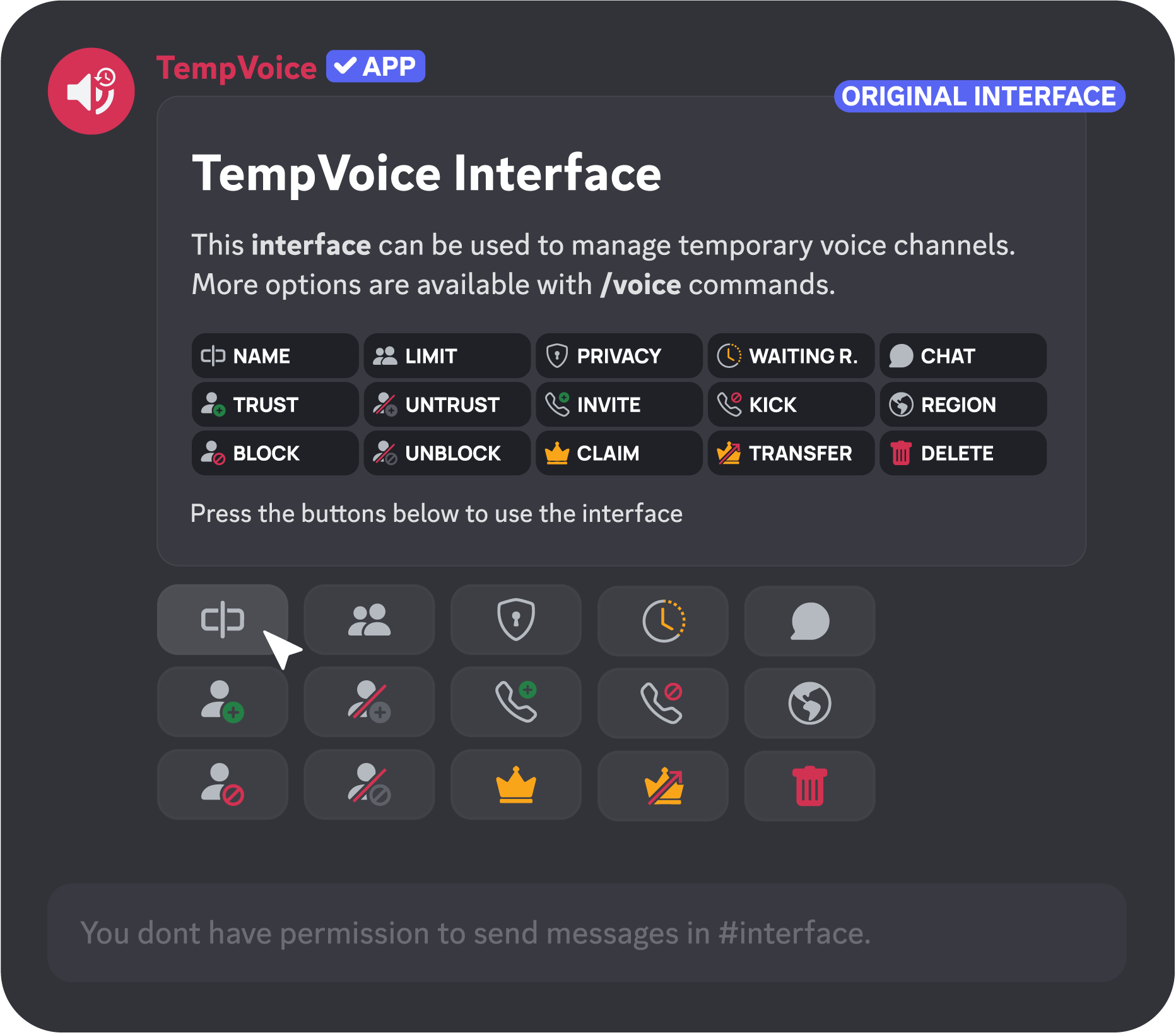
|It is a voice channel, but only temporary and managed by the user who created it. This means that the channel only exists as long as someone is in it and that you no longer have empty voice channels on your Discord server which just taking up space.|

|Setup & Configure TempVoice|
| ------------ |
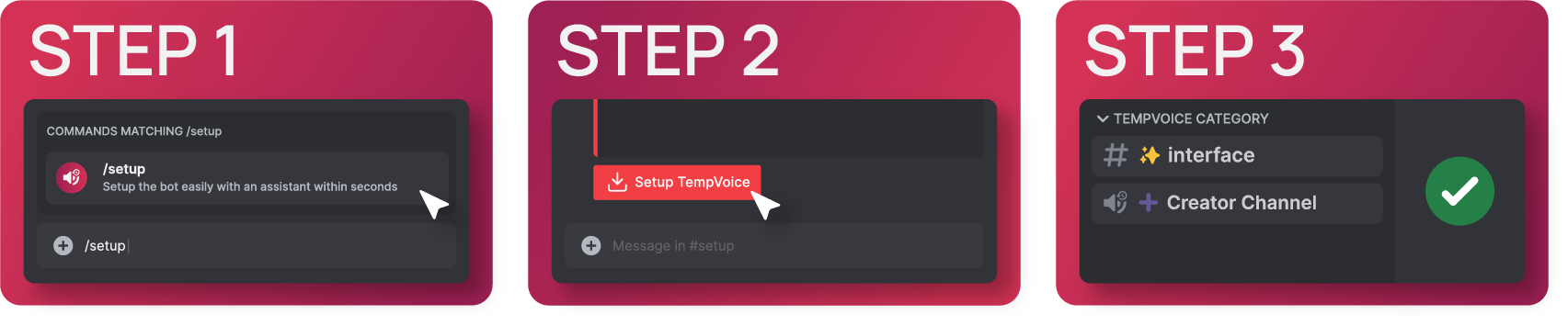
|Visit the bot's dashboard (https://tempvoice.xyz/dashboard) to configure TempVoice and use /setup to create all the necessary channels such a ➕ Creator Channel & ✨ Interface Message.|
|➕ Creator Channel|
| ------------ |
|Create your first temporary channel by joining the ➕ Creator Channel (voice channel) and the bot will move you into your new channel.|
|✨ Interface Message|
| ------------ |
|Manage your temporary channel by using /voice slash commands or a ✨ Interface Message to edit the name, user limit and permissions of your channel.|
|Comparison of Classic & Temporary|Classic Voice Channel|Temp Channels|
| ------------ | ------------ |
|Disappear Automatically|❌|✅|
|Censor Channel Names|❌|✅|
|Fully Customizeable by Users|❌(admin required)|✅|
|Fully Moderateable by Users|❌(admin required)|✅|
Commands (5)
joinJoin a temporary channel by using a password
/join
setupSetup the bot easily with an assistant within seconds
/setup
findFind out which voice channel a user is in
/find
voiceConfigure the temporary channel for all your needs
/voice
helpGet help with the TempVoice Discord Bot
/help
Reviews
What server admins say
BotBoard
TempVoice: Discord Bot Reviews, Stats & Invite
www.botboard.gg
Similar Bots
View all
neon.
Verified597.3K servers

Suzuka
Verified5810.5K servers

Talking Ben
Verified578.4K servers

React Bot
Verified52826 servers

Chilling
Verified523.7K servers

ProLexBot
Verified511.2K servers

Karibbit
Verified511.4K servers

OtterBot
Verified50835 servers

Oxie
Verified47159 servers

Huddles
Verified46304 servers

Spoiler Bot
Verified45105 servers

gobot
Verified43104 servers

Buck
Verified4045 servers

MLBCore
Verified3933 servers

SkyBotik
Verified3824 servers

KovirumBot
361.5K servers

JETSTERS BOT
Verified324 servers

One Word Story
31282 servers

Mimo
29174 servers

MegaBot
27173 servers