
FunVerified by Discord
QOTD Bot
QOTD Bot helps keep your community active by automatically posting questions, facts, quotes, and more!
freemiumSlash commandsListed 6 months ago
Servers
+1.1%30dgrowth over the last 30 days188K
Discord servers using it · 188,000
Health
70
Good
out of 100
Server count39.7/55
Verified by Discord15/15
Listing completeness10/10
Claimed listing0/15
Reviews0/5
Growth5/5
Open source0/5
Standing
#37
in Utility, of 5,449 bots
See it in action
QOTD Bot in a channel
Try a command:
- /suggestions: Manage suggested cards.
- /deck: Manage decks.
- /card: Manage cards.
- /channel: Manage channel.
- /suggest: Suggest cards or edit your suggestions.
About
What QOTD Bot does
Introduction
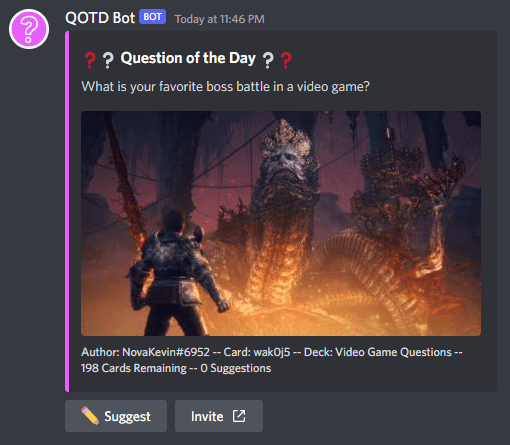
QOTD Bot helps keep your community active by automatically posting questions, facts, quotes, and more!
Features
- Schedule posts daily, weekly, monthly, or whatever custom schedule!
- Use the built-in "QOTD Starter Deck" or add your own custom cards (questions, facts, quotes, etc).
- Control how posts are made, with support for threads and pinning messages.
- Automatically ping roles when posts are made.
- Allow users to submit card suggestions for the server!
- Use the queue to control which cards are posted next!
- Customize your post with a custom title, description, and color!
Getting Started
To get started, simply run the /setup command using a channel that you want QOTD Bot to automatically post cards in. If you don't already have a channel, please create one first.
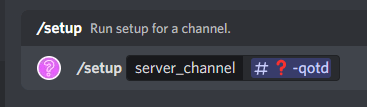
The setup process will guide you through the settings needed to get started. Simply follow the prompts and enter responses where appropriate.
Cards and Decks
What are Cards?
Cards are the items being posted in the channel. These could be questions, facts, trivia, quotes, or whatever you'd like.
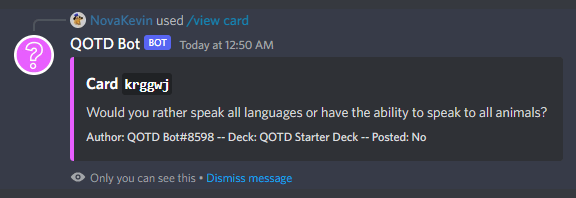
Cards can be created in 2 different ways:
- Creating cards with the
/card addcommand will directly add new cards to a deck. - Suggesting cards with the
/suggest newcommand will add the card to the channel's suggestions. These will need to be approved by staff before they are added to a deck.
What are Decks?
Decks are a group of cards, and all cards must be part of a deck. They help to organize cards into different categories, or with different settings, within the same channel.
For example, you might have separate decks for Would You Rather, Video Game Questions, and Member Suggestions all under the same #question-of-the-day channel.
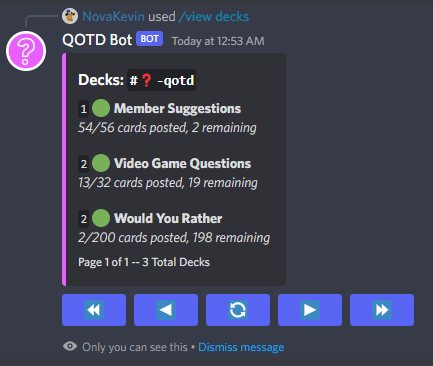
You can create new decks with the /deck new command.
Decks can also be prioritized to determine which cards are posted first. For example, you might want to post any cards in the Member Suggestions deck before posting Would You Rather cards, so you can give Member Suggestions a higher priority of 1 and Would You Rather a lower priority of 2. Decks with the same priority will be treated as if they were combined.
Commands
List of Commands
Below is a list of all commands available in QOTD Bot. Some commands may be hidden if you don't have permission to view them in Discord.
/setup- Run setup for a channel./view
- channels - View all channel setups.
- decks - View all decks in a channel.
- cards - View cards in a deck.
- card - Preview a specific card.
- queue - View the queue for a channel.
- suggestions -View suggested cards for a channel.
/community
- browse - Browse community decks.
- tags - Browse community deck tags.
- search - Search community decks.
- info - View a community deck's information.
- cards - View a community deck's cards.
- edit
- name - Edit a community deck's name.
- description - Edit a community deck's description.
- tag - Toggle a community deck's tag.
- language - Edit a community deck's language.
- delete - Delete a community deck.
/server
- settings - View server settings.
- edit
- time_zone - Edit server time zone.
- language - Edit server language.
- `/channel
Commands (5)
suggestionsManage suggested cards.
/suggestions
deckManage decks.
/deck
cardManage cards.
/card
channelManage channel.
/channel
suggestSuggest cards or edit your suggestions.
/suggest
Reviews
What server admins say
BotBoard
QOTD Bot: Discord Bot Reviews, Stats & Invite
www.botboard.gg
Similar Bots
View all
Pingcord
Verified74663.0K servers

heist
Verified6433.6K servers

FixEmbed
Verified574.0K servers

MGS
Verified521.6K servers

Crashbot
Verified50863 servers

Y&T Notify
Verified491.7K servers

Dynamo
Verified49309 servers

OG-BirthdayBot
Verified48517 servers

SonBot
Verified47955 servers

Rekted
Verified46261 servers

Cosmic
Verified46290 servers

KindBot
Verified4585 servers

Shiro-san
Verified4297 servers

Lumora
Verified4297 servers

Funky Text
Verified4052 servers

Twitch Alerts 📢
373.7K servers

V4MP
Verified3613 servers

Aegis
Verified335 servers

Cade
29146 servers

DaGrateBot
2791 servers